
Planning to switch carriers, travel internationally, or simply want the freedom to use your phone wherever you choose? If you own a Boost Mobile phone, you’ll need to unlock it first before using it with another wireless provider. While Boost Mobile does offer free unlocking services, the process comes with specific requirements and can sometimes be challenging to navigate.
This comprehensive guide walks you through everything you need to know about how to unlock Boost Mobile phone devices. Whether you meet the standard eligibility requirements or need alternative solutions, you’ll find step by step instructions, troubleshooting tips, and expert advice to successfully unlock your device and gain the flexibility you deserve.
Understanding Boost Mobile’s Unlock Policy
Before diving into the unlocking process, it’s essential to understand what device locking means and how Boost Mobile’s policies work.
What Does Locked vs Unlocked Mean?
When you purchase a phone from Boost Mobile, it typically comes with a carrier lock. This means your device is programmed to work exclusively with Boost Mobile’s wireless network and cannot be activated on competing carriers like AT&T, Verizon, or T Mobile. The lock is a software restriction built into the phone’s programming.
An unlocked phone, on the other hand, has no such restrictions. Once unlocked, you can insert a SIM card from virtually any compatible carrier and start using their network immediately. This freedom is especially valuable for international travelers who want to use local SIM cards abroad or for people looking to switch to carriers with better rates. If you’re unlocking for travel or switching carriers, you may also want to see this step-by-step guide on how to unlock a T-Mobile phone so you can compare requirements and final activation steps across networks.
Boost Mobile’s Official Unlock Requirements
Boost Mobile follows specific guidelines established by the Federal Communications Commission regarding phone unlocking. For prepaid customers, Boost will automatically unlock eligible devices remotely within two business days after the phone becomes eligible. The process should happen without additional fees once you meet all requirements.
For postpaid devices, if you’ve purchased your phone outright and paid in full, it becomes eligible for unlocking immediately. If you’re on a financing plan, you’ll need to complete the payment plan before your device qualifies for unlocking.
Prepaid vs Postpaid Device Differences
The unlocking timeline varies significantly based on your plan type. Prepaid Boost Mobile customers must wait 12 months from initial activation before their device becomes eligible. This 12 month period applies regardless of how much you’ve paid or how actively you’ve used the service during that time.
Postpaid customers have more flexibility. Once your device financing is complete, or if you purchased the phone at full price initially, Boost will unlock it within two business days of eligibility. This makes postpaid plans more attractive for customers who value flexibility and plan to switch carriers soon.
Eligibility Requirements to Unlock Your Boost Mobile Phone
Meeting Boost Mobile’s eligibility criteria is crucial for a successful unlock request. Here’s what you need to know about each requirement.
The 12 Month Active Service Rule
For prepaid devices, the most significant hurdle is the mandatory 12 month waiting period. Your phone must have been continuously active on Boost Mobile’s network for at least one year from the original activation date. This means 365 days of service, not just 12 billing cycles.
The timer starts from when you first activated the device with Boost, not from when you purchased it. If you bought the phone but waited before activating service, that waiting time doesn’t count toward your 12 months.
Account Must Be in Good Standing
Your Boost Mobile account needs to be current with no outstanding balances or unpaid bills. If your account is suspended due to non payment, your device won’t qualify for unlocking until you resolve all payment issues and restore active status.
Additionally, any violations of Boost Mobile’s terms of service could disqualify you from unlock eligibility. This includes activities like fraud, theft, or other policy violations that might flag your account.
Device Must Be Fully Paid Off
If you purchased your phone through a financing program or installment plan, every dollar must be paid before Boost will consider unlocking it. This applies to both BoostUP! financing plans and any other payment arrangements you may have made.
Check your account to verify that no balance remains on the device. Even a small remaining balance will prevent the unlock process from moving forward.
Military Personnel Exceptions
Boost Mobile makes accommodations for active military members and their families facing deployment overseas. If you’re in the military and need your phone unlocked for international use during deployment, you won’t need to wait the full 12 months.
To qualify for this exception, you’ll need to provide documentation proving your deployment orders. Keep in mind that each phone number can only receive two unlocked devices within any 12 month period under military exceptions.
How to Check If Your Boost Phone Is Already Unlocked
Before going through the unlock process, you should verify whether your phone is actually locked. Sometimes phones are already unlocked without the owner realizing it.
Insert Another Carrier’s SIM Card
The most straightforward way to test lock status is using a SIM card from a different carrier. Power off your Boost Mobile phone, remove the Boost SIM card, and insert a SIM from AT&T, T Mobile, Verizon, or any other carrier.
Turn your phone back on. If it connects to the new network and you can make calls or use data, your phone is unlocked. If you see an error message like “SIM not supported” or “Network locked,” your device is still locked to Boost Mobile.
Check Network Lock Status in Settings
Android devices often have a built in way to check lock status. Navigate to Settings, then Connections (or Network & Internet), then More Connection Settings. Look for an option called “Network Lock Status” or “SIM Lock Status.”
If it displays “Locked” or “Locked to Boost Mobile,” your device is still carrier locked. If it shows “Unlocked” or “Permanent Unlock,” you’re good to go. The exact menu path varies by manufacturer, so you might need to search your settings for these options.
Call Boost Customer Service
When in doubt, contact Boost Mobile directly at 833 50 BOOST (833 502 6678). Their customer service representatives can look up your account and device information to confirm whether your phone has been unlocked in their system.
Be prepared to provide your account number, phone number, and the device’s IMEI number. While this method is reliable for checking Boost’s records, remember that their system might show a phone as unlocked even if the device itself hasn’t received the unlock signal yet.
What Your IMEI Number Reveals
Your IMEI (International Mobile Equipment Identity) number is a unique 15 digit identifier for your phone. Third party IMEI checking services can sometimes reveal carrier lock status, though results aren’t always accurate.
These services query databases to determine which carrier the phone is locked to and sometimes whether any unlock requests are pending. However, for the most reliable information, always defer to testing with an actual SIM card from another carrier.
Step by Step How to Unlock Boost Mobile Phone Official Method
Ready to request an unlock through Boost Mobile’s official process? Follow these detailed steps for the best chance of success.
Before You Start Gather Required Information
Preparation is key to a smooth unlock process. Have the following information ready before contacting Boost Mobile:
Your Boost Mobile phone number or account number, the device’s IMEI number (dial *#06# to display it), proof that you meet all eligibility requirements (12 months of service, account in good standing, device paid off), and alternative contact information in case Boost needs to reach you.
Double check that you’ve met the 12 month service requirement by calculating the exact date you activated your device. If you’re even a day short, your request will be denied.
Contact Boost Mobile Customer Service

Call Boost Mobile at 833 50 OST (833 502 6678) during their business hours. When you reach a representative, clearly state that you want to request a carrier unlock for your device.
Be polite but firm. Some representatives may try to convince you to stay with Boost or may incorrectly state that your phone doesn’t meet requirements. If you’re certain you’re eligible, politely insist on submitting the unlock request or ask to speak with a supervisor.
Request the Unlock Process
The customer service representative will verify your eligibility by checking your account status, payment history, and device information. They’ll confirm your IMEI number and may ask why you want to unlock the phone (you’re not obligated to explain, but being honest often helps).
If you meet all requirements, they should immediately submit your unlock request. Make sure to get a confirmation number or ticket number for your records. This documentation is crucial if you need to follow up later.
Wait for Confirmation Timeline Explained
For eligible devices, Boost Mobile states they will complete the remote unlock within two business days. However, real world experiences vary. Some customers receive confirmation within 24 hours, while others wait up to a week.
During this waiting period, keep your Boost SIM card in the phone and maintain a connection to either Boost Mobile’s network or WiFi. The unlock process happens remotely, and your phone needs connectivity to receive the unlock signal.
You should receive an email or text message confirming when the unlock is complete. Some phones display an on screen notification. If you don’t hear anything after 2 to 3 business days, call back to check on your request status using your confirmation number.
Verify Your Phone Is Unlocked
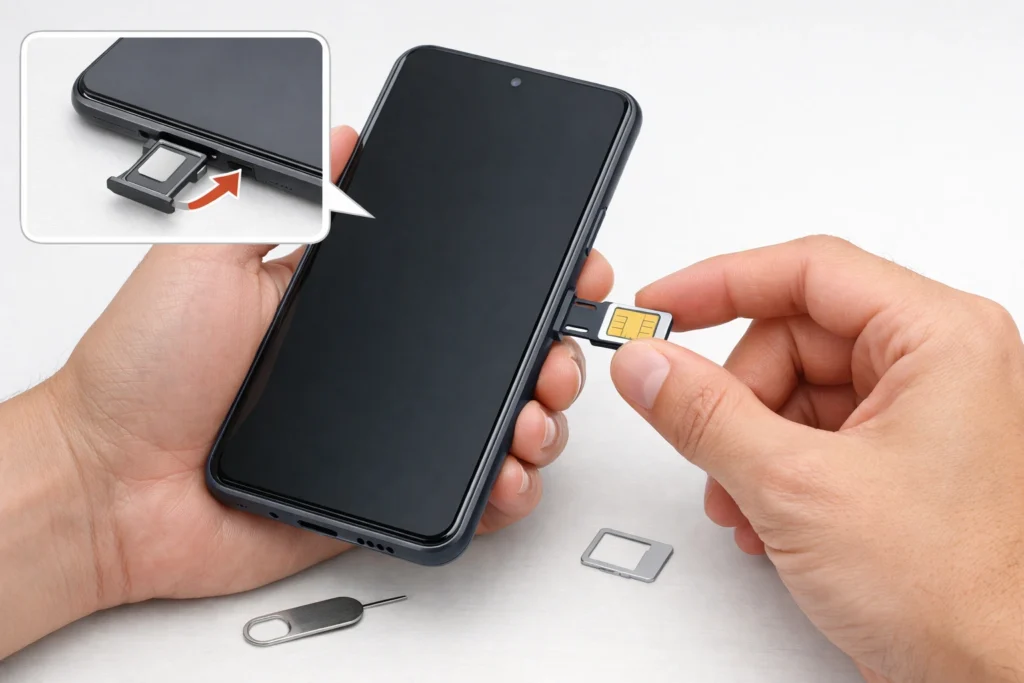
Once you receive confirmation, test the unlock by inserting a SIM card from a different carrier. The phone should recognize the new network and allow you to make calls or use data after a quick restart.
If the unlock didn’t work despite receiving confirmation, remove and reinsert the SIM card, restart the phone, and try again. Sometimes the unlock takes effect only after a full power cycle. If problems persist, contact Boost immediately with your confirmation number.
How to Find Your IMEI Number
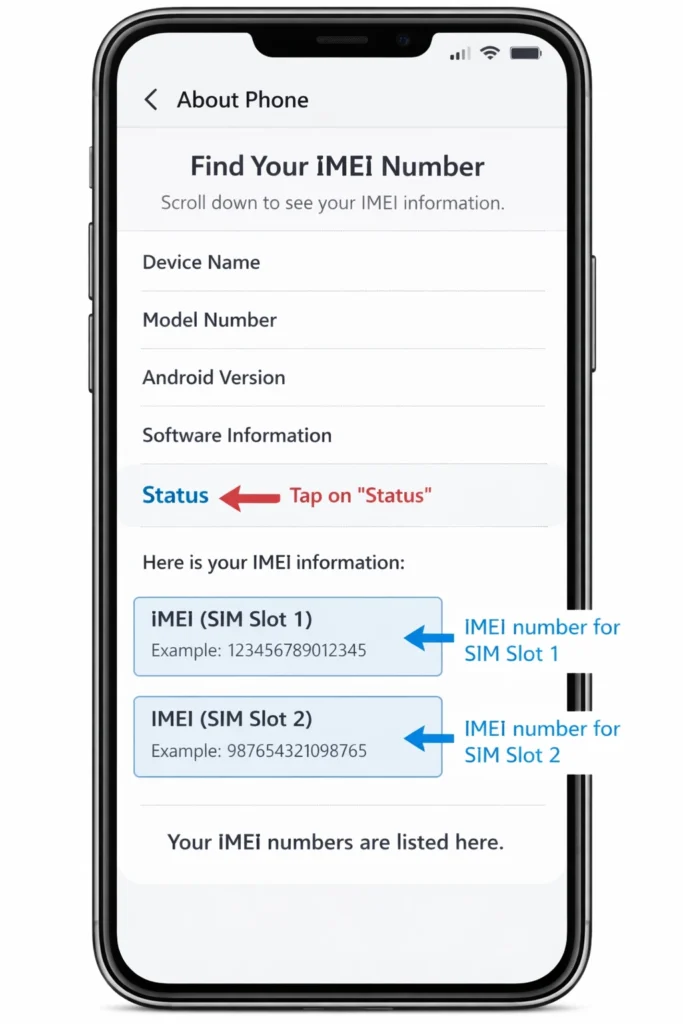
Your IMEI number is essential for unlocking. Here’s how to locate it on different devices.
On Android Devices
The quickest method works on virtually all Android phones: open your phone dialer and enter *#06#. The IMEI number appears instantly on your screen. You don’t need to press the call button.
Alternatively, go to Settings, scroll to About Phone, then look for Status or IMEI Information. The 15 digit number listed is your IMEI. Some dual SIM phones display two IMEI numbers; use IMEI 1 for unlock requests.
On iPhone Devices
For iPhones, open Settings and tap General. Select About and scroll down to find IMEI. The number is listed along with other device information like model number and serial number.
On iPhones with both physical SIM and eSIM capabilities, you’ll see multiple IMEI numbers listed. The primary IMEI is typically the one associated with the physical SIM tray.
Alternative Methods to Locate IMEI
If you still have your phone’s original packaging, the IMEI is usually printed on a sticker on the box. This is helpful if your phone is damaged or won’t power on.
For iPhones, you can also find the IMEI by connecting to a computer and opening iTunes or Finder. Select your device and view the device information tab. The IMEI displays along with other device identifiers.
Alternative Methods Unlock Boost Mobile Phone Before 12 Months
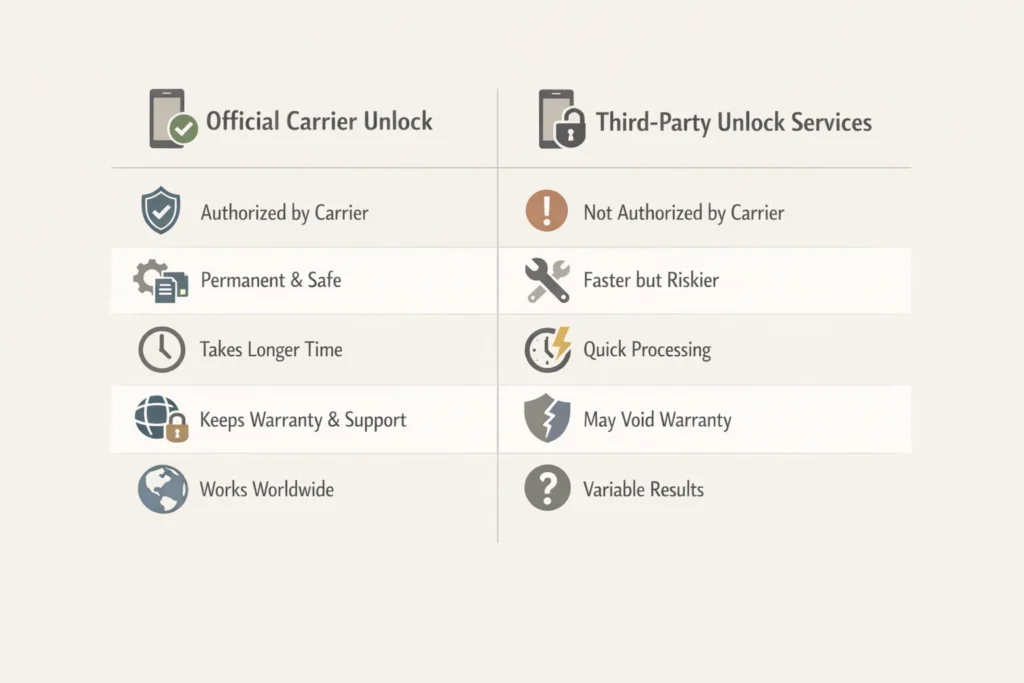
What if you need to unlock your phone but haven’t reached the 12 month mark yet? Third party services offer alternatives.
Third Party Unlock Services Overview
Several legitimate businesses specialize in unlocking carrier locked phones. These services work by obtaining unlock codes directly from manufacturers or using proprietary software methods. They don’t require you to meet carrier eligibility requirements.
Popular options include DirectUnlocks, SafeUnlocks, IMEIUnlockSIM, and similar services. These companies typically charge between $15 to $50 depending on your phone model and carrier. Processing times range from a few hours to 24 hours for most devices.
Pros and Cons of Paid Unlock Services
The main advantage is bypassing Boost Mobile’s 12 month waiting period. If you need your phone unlocked immediately for travel or carrier switching, third party services can help when official channels can’t.
These services also handle the technical process for you. You simply provide your IMEI number and payment, then receive unlock instructions via email. There’s no need to argue with customer service or prove eligibility.
However, there are downsides. You’ll pay a fee whereas Boost’s official unlock is free. There’s also a small risk of fraud from unscrupulous websites. Additionally, some unlock methods might violate warranty terms, though permanent IMEI based unlocks typically don’t cause issues.
Recommended Services DirectUnlocks, SafeUnlocks
Based on customer reviews and reliability, DirectUnlocks stands out for its transparent process and reasonable pricing. They offer a money back guarantee if the unlock fails and provide customer support throughout the process.
SafeUnlocks is another trusted option with competitive rates (often around $1 15 per device) and quick turnaround times. They specialize in Boost Mobile and other prepaid carriers.
Always research any service before paying. Look for customer testimonials, check how long they’ve been in business, and verify they offer refunds for failed unlocks.
Cost Comparison and Processing Times
Official Boost Mobile unlocking is free but requires meeting eligibility criteria and waiting 2+ business days. Third party services charge $15 50 but process requests within 24 hours regardless of how long you’ve had service.
For comparison: DirectUnlocks typically charges $20 35 for Android devices and $30 45 for iPhones. SafeUnlocks advertises rates as low as $1 for certain models. IMEIUnlockSIM falls in the $25 40 range for most Boost phones.
Processing time with third party services averages 12 24 hours, though some phones take up to 72 hours. Samsung devices tend to unlock faster (often within 6 hours) compared to other brands.
Common Problems When Unlocking Boost Mobile Phones
Even when following instructions carefully, problems can arise. Here’s how to troubleshoot common issues.
Phone Says Unlocked But Still Won’t Accept New SIM
This frustrating scenario occurs more often than it should. Boost’s system might show your phone as unlocked, but the device itself hasn’t received or processed the unlock signal properly.
First, try the basics: remove the new carrier’s SIM card, power off your phone completely, wait 60 seconds, reinsert the SIM, and power back on. Sometimes the phone needs a full reset to recognize its unlocked status.
If that doesn’t work, put the Boost SIM back in temporarily, ensure you’re connected to WiFi or cellular data, and wait several hours. The unlock signal might still be propagating to your device. Some phones require 24 48 hours to complete the process.
Customer Service Claims It’s Unlocked But It’s Not
This is perhaps the most common complaint about Boost Mobile’s unlock process. Their internal system shows the unlock as complete, but testing with another carrier’s SIM reveals the phone is still locked.
Document everything. Take screenshots of error messages you receive when inserting the new SIM. Note the network lock status in your settings showing “Locked.” Record dates, times, and names of customer service representatives you speak with.
Call back and ask to speak with a supervisor. Explain that while their system shows unlocked status, the physical device is demonstrably still locked. Request they resubmit the unlock or escalate to their technical support team.
Unlock Request Denied or Ignored
If Boost denies your unlock request despite meeting eligibility requirements, or if they simply ignore your request without response, you have escalation options.
First, confirm you actually meet all requirements: 12 months of active service (check the exact activation date), account in good standing with zero balance, device fully paid off, and not reported lost or stolen.
If you’re certain you’re eligible, request the reason for denial in writing. Boost must provide specific reasons under FCC regulations. If they can’t justify the denial, file a complaint with the FCC at consumercomplaints.fcc.gov. Many customers report success after involving the FCC.
How to Escalate Issues and File FCC Complaints
When Boost’s customer service fails to resolve your unlock issue, the Federal Communications Commission offers recourse. The FCC requires carriers to unlock eligible devices and provides a complaint process when they don’t.
Visit the FCC’s website and file a formal complaint. Include all documentation: your account number, IMEI, dates of service, confirmation numbers from unlock requests, and a detailed description of the problem. The FCC forwards your complaint to Boost, who must respond within 30 days.
Many customers who faced unlock denials report that FCC complaints prompted immediate action from Boost. In some cases, phones were unlocked within days of filing the complaint after months of unsuccessful attempts through normal channels.
After Unlocking What You Need to Know
Successfully unlocking your phone is just the beginning. Here’s what to expect next.
Which Carriers Work With Unlocked Boost Phones?
Boost Mobile uses a CDMA network, which affects compatibility with other carriers. Historically, Boost phones work best with other CDMA carriers like Verizon and US Cellular after unlocking.
However, most modern Boost phones manufactured after 2015 are DSU capable (Domestic SIM Unlock), meaning they can work with both CDMA and GSM networks once unlocked. This expands your options to include T Mobile, AT&T, and their subsidiary carriers like Mint Mobile, Cricket Wireless, and Metro by T Mobile.
Before switching carriers, verify your specific phone model’s compatibility with your desired carrier using their online compatibility checker tools.
CDMA vs GSM Compatibility Explained
CDMA (Code Division Multiple Access) and GSM (Global System for Mobiles) are different cellular technologies. In the United States, Verizon and Sprint (now part of T Mobile) traditionally used CDMA, while AT&T and T Mobile used GSM.
Older Boost phones may only support CDMA bands, limiting your carrier choices after unlocking. Newer Boost devices typically support both technologies, giving you more flexibility. Check your phone’s specifications to determine which network types it supports.
If your phone only supports CDMA, you’ll be limited to Verizon and smaller regional carriers that use Verizon’s network. GSM compatible phones work with AT&T, T Mobile, and most international carriers.
Do You Need a New SIM Card?
Yes, you’ll need a SIM card from your new carrier to use their network. Your Boost Mobile SIM won’t work with other carriers even after unlocking.
Most carriers offer free SIM cards when you activate new service. You can pick them up at retail stores or order them online. Some carriers also support eSIM activation, which doesn’t require a physical card at all.
Make sure to get the correct SIM card size for your device (standard, micro, or nano). Most modern phones use nano SIM cards, but verify your phone’s requirements before ordering.
Will Your Phone Work Internationally?
Unlocking your Boost phone opens up international travel possibilities. Once unlocked, you can purchase local SIM cards when traveling abroad, avoiding expensive international roaming charges.
However, international compatibility depends on your phone’s supported frequency bands. Different countries use different cellular frequencies. Most newer Boost phones support common international bands, but older or budget models might have limited international functionality.
Before traveling, research which frequencies your destination country uses and verify your phone supports those bands. This information is usually available in your phone’s technical specifications.
Conclusion
Unlocking your Boost Mobile phone opens doors to carrier freedom, international travel flexibility, and better plan options. While Boost’s official process requires patience with the 12 month waiting period, it’s completely free for eligible customers. Simply contact their customer service, wait 1 2 business days for remote processing, and verify the unlock worked by testing with another carrier’s SIM card.
For those who can’t wait or don’t meet eligibility requirements, reputable third party unlock services provide fast alternatives for reasonable fees. Whichever route you choose, always document your interactions, verify unlock success through actual testing, and don’t hesitate to escalate issues if you encounter problems. Ready to unlock your Boost Mobile phone? Gather your account information, confirm your eligibility, and take the first step toward carrier freedom today.
FAQ Section
Q: How long does it take to unlock a Boost Mobile phone?
A: Through Boost’s official process, unlocking takes 1 2 business days after they approve your request, provided you meet all eligibility requirements. Third party services typically complete unlocks within 12 24 hours. However, some customers report waiting up to a week for official unlocks to take effect.
Q: Can I unlock my Boost Mobile phone before 12 months?
A: Not through Boost’s official process unless you’re active military with deployment orders. However, third party unlock services can unlock your phone before the 12 month mark for a fee, typically ranging from $15 to 50 depending on your device model.
Q: Is it free to unlock a Boost Mobile phone?
A: Yes, Boost Mobile provides free unlocking services for eligible devices. You won’t be charged any fees if you meet the requirements: 12 months of active service, account in good standing, and device fully paid off. Third party alternatives charge fees but don’t have eligibility requirements.
Q: How do I check if my Boost Mobile phone is unlocked?
A: Insert a SIM card from a different carrier into your phone. If it connects to the network and allows you to make calls, your phone is unlocked. You can also check Settings > Connections > Network Lock Status on Android devices to see if it shows “Locked” or “Unlocked.”
Q: What is an IMEI number and where do I find it?
A: Your IMEI (International Mobile Equipment Identity) is a unique 15 digit identifier for your phone. Find it by dialing *#06# on your phone’s keypad, checking Settings > About Phone on Android, or Settings > General > About on iPhone. It’s also printed on your phone’s original packaging.
Q: Will unlocking my Boost Mobile phone void the warranty?
A: No, legitimate unlocking methods do not void your phone’s warranty. The Unlocking Consumer Choice and Wireless Competition Act legalized phone unlocking in 2014, and carriers cannot void warranties solely because a phone was unlocked. Both official and reputable third party IMEI unlocks are warranty safe.
Q: Can I use an unlocked Boost phone with any carrier?
A: Not necessarily. While unlocking removes Boost’s software restrictions, physical compatibility depends on your phone’s hardware. Most modern Boost phones support both CDMA and GSM networks, working with carriers like Verizon, AT&T, and T Mobile. However, always verify compatibility with your desired carrier’s network before switching.